









.svg)

Your field sales reps have important customer conversations every day. They confirm orders, follow up after visits, answer pricing questions, handle customer instructions, resolve issues, and coordinate with internal teams. The problem is that much of this communication still lives in private inboxes. Skynamo’s email-to-timeline feature eliminates these silos.
How to turn scattered emails into useful sales intelligence
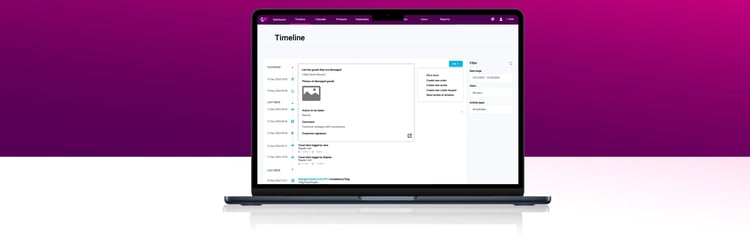
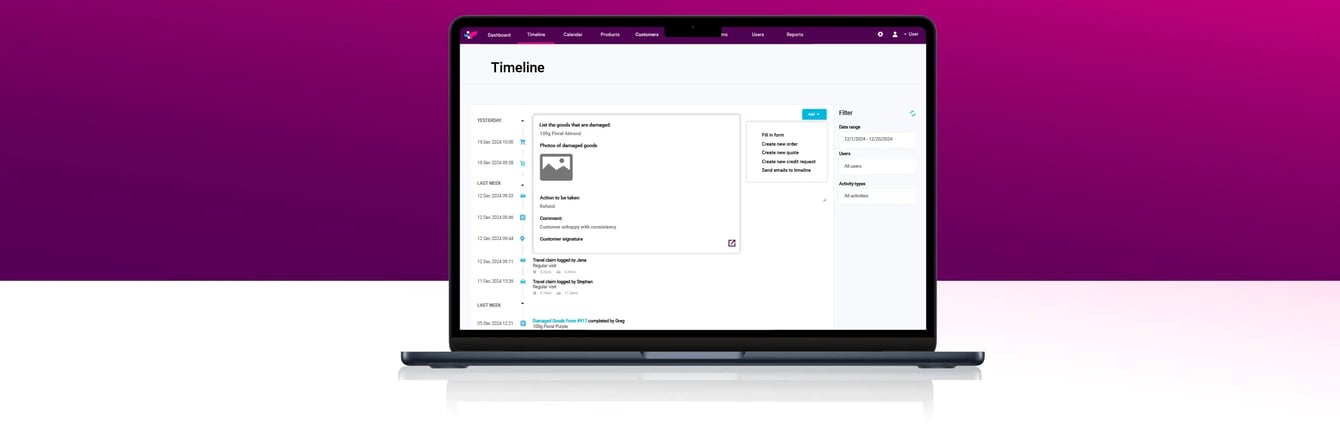
Skynamo’s email-to-timeline feature on our Field Sales App allows relevant customer emails to be sent directly into the correct customer activity timeline inside Skynamo. Mic drop. That’s enough to make you want to email customers every day.
That means the email becomes part of the customer record, alongside field activity, visits, call reports, B2B ordering, notes, and other sales interactions. No scrolling through inboxes. No “I’ll log it later”. No customer context disappearing when a rep is unavailable.
Skip the queue: Give me a demo
Key takeaways
- Skynamo’s email-to-timeline feature helps field sales teams keep customer communication linked to the correct customer account.
- It reduces admin for reps by making it easier to capture relevant emails without retyping or duplicating work.
- It improves sales manager visibility by showing customer communication alongside visits, activity, orders, call reports, and account history.
- It supports better handovers, cleaner follow-ups, and more consistent customer service.
As part of Skynamo’s Field Sales App and broader Sales Operations platform, email-to-timeline helps your team build a more complete, useful customer record.
What is Skynamo’s email-to-timeline feature?
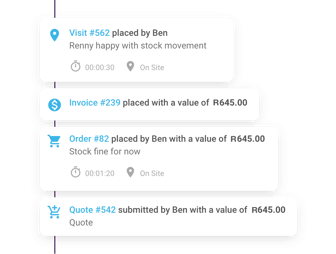 Skynamo’s email-to-timeline feature allows your team to send or forward relevant emails into a customer’s activity timeline in Skynamo. At a practical level, emails sent to a configured Skynamo address can be attached to the correct customer account or contact.
Once attached, the communication becomes part of that customer’s activity history. That means your team can keep important customer communication visible inside Skynamo, instead of leaving it scattered across individual inboxes. For field sales teams, this is especially useful because email is often where important decisions and instructions are confirmed.
Emails may include:
- Order amendments
- Pricing approvals
- Delivery instructions
- Follow-up actions after a visit
- Customer complaints or queries
- Internal sales coordination
- Product availability discussions
- Account-related instructions
With email-to-timeline, that communication can sit where your sales team actually needs it: against the customer account.
Related: Ditching WhatsApp and Excel: How a mobile app delivers field transparency for SA sales directors
How email-to-timeline fits into the Skynamo Field Sales App
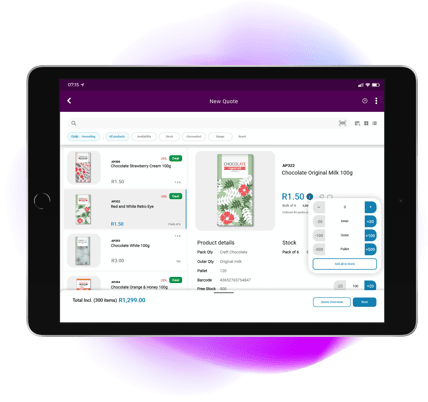 Skynamo’s Field Sales App helps reps manage their day-to-day work in the field. It gives them access to customer information, visit schedules, call reports, product and pricing information, order capture, and sales activity history. Email-to-timeline supports this by adding another important layer of context: customer communication.
A sales rep may complete a visit, capture notes, place an order, and then send a follow-up email to confirm next steps. With email-to-timeline, that follow-up can be added to the customer’s activity timeline, so the visit record and the email trail sit together. That gives your team a fuller view of the account.
As a business owner or sales manager, you can see what happened in the field, what was discussed afterwards, what was agreed by email, and what still needs attention. For sales reps, this reduces admin. For managers, it improves visibility. For the business, it creates a more reliable customer record.
Why field sales teams lose customer communication
Customer communication usually gets lost because the sales process is spread across too many places.
One piece of information sits in an inbox. Another is captured in a visit report. An order sits in the sales system. A follow-up happens on a phone call. A pricing decision is confirmed by email. A manager gets the update verbally.
That may work while everything is fresh in everyone’s mind. It does not work well when the account becomes busy, the rep is on the road, or another person needs to step in. In South African field sales teams, this is a common reality. Reps often manage large territories, long routes, different customer types, urgent order changes, patchy connectivity, and multiple communication channels. If the customer record is incomplete, the team loses visibility.
The effects of poor customer communication
- Repeated follow-up questions
- Missed customer instructions
- Slow handovers
- Confusion around what was agreed
- Managers chasing reps for updates
- Customers having to explain the same issue again
- Important context sitting with one person only
Email-to-timeline helps reduce this risk. It makes customer emails part of the shared sales record and sales conversation.
Why private inboxes create sales visibility problems
Email is useful. Private inboxes are the problem. When important customer conversations stay in one person’s inbox, your sales team does not have a complete view of the account.
The issue is not that reps are hiding information. Most of the time, they are simply busy. They send the email, move to the next customer, and plan to update the system later. Then the day gets away from them. Skynamo’s email-to-timeline feature removes some of that friction by helping teams capture communication in the customer timeline as part of the normal workflow.
Explore: Why a field sales app with offline capability is a must
How email-to-timeline reduces admin for sales reps
Reps do not need more admin. They need better ways to capture the work they are already doing. Email-to-timeline helps because it works with a behaviour that already exists: sending email. Instead of retyping notes or copying and pasting email threads into another system, reps can send relevant communication into Skynamo so it is stored against the correct customer.
This built-in email capability helps reduce:
- Manual CRM updates
- Duplicate data capture
- End-of-day admin
- Forgotten follow-ups
- Incomplete customer notes
- Reliance on rep memory
At Skynamo, we know that field sales reps should spend their time with customers, not on rebuilding customer history after the fact. When the process is easier, the information is more likely to be captured properly. And the sales app is more likely to be used.
Explore: Best Apps for Sales Reps
How email-to-timeline improves sales manager visibility
Sales managers need a clear view of what is happening across customers, reps, regions, and accounts.
But if key communication only lives in inboxes, managers are forced to ask for updates, wait for reports, or piece together the story from different sources.
Email-to-timeline gives managers better visibility into customer interactions by making relevant emails part of the customer activity history. It also makes coaching more practical. Instead of asking, “What happened with this account?”, managers can review the timeline and have a better-informed conversation with the rep.
Explore: Why Growing Businesses Need a Sales Rep Tracking App
Practical use cases for email-to-timeline
Email-to-timeline is useful because it supports real field sales work. It is not another feature that sounds clever in a demo and disappears in daily use. Here are a few practical ways your team can use it.
1. Log follow-ups after a customer visit
A rep visits a customer, discusses stock, pricing, merchandising, or product performance, and then sends a follow-up email. That email can be added to the customer timeline so the visit record and follow-up communication are connected. This gives the manager and the next account owner a clearer picture of what happened.
2. Capture order confirmations and amendments
Customers often confirm changes by email. They may adjust quantities, add products, change delivery details, or approve substitutions. When these emails are stored in the customer timeline, your team has a clearer record of what the customer requested and when.
3. Keep customer instructions visible
Small instructions can cause big problems when they are missed. A customer may ask for deliveries to go to a specific entrance, invoices to be sent to a certain person, or future orders to follow a particular process.
If those instructions stay in one inbox, they can easily be missed by the next person dealing with the account. Adding them to the customer timeline makes them easier for the wider team to find and use.
4. Record pricing approvals
Pricing conversations can become difficult when the approval trail is unclear. If a discount, special price, promotion, or exception is confirmed by email, adding that communication to the customer timeline gives your team a more reliable record of what was approved. This is useful for reps, managers, finance teams, and anyone who needs to check the account history later.
5. Support dispute resolution
When there is a query around an order, delivery, price, credit, or service issue, email often contains important context. By keeping that communication in the timeline, your team can see what was said, what was promised, and what still needs to be resolved. This helps avoid repeated questions and gives the customer a more professional experience.
6. Improve internal handovers
Sales teams are not one-person operations. Reps, managers, finance, operations, customer service, and warehouse teams may all need context at different points. When relevant customer emails are part of the Skynamo timeline, handovers become cleaner because the information is attached to the account, not trapped in one person’s mailbox.
How email-to-timeline supports better customer account history
A strong customer account history should show more than orders. It should help your team understand the full relationship. Email-to-timeline helps strengthen that history by adding customer communication to the same activity view.
This is especially useful when accounts change hands. A new rep should not have to start from scratch. A manager should not have to call around for context. A customer should not have to repeat the same story because the previous communication is missing. When your customer history is visible, your team can act with more confidence.
Explore: What to do when your sales rep leaves
How this feature supports Skynamo’s Sales Operations platform
Skynamo is built to help B2B sales teams manage field sales activity, customer interactions, order capture, and sales operations more effectively. Email-to-timeline supports that bigger picture. On its own, the feature helps you capture customer email communication. Within the Skynamo Sales Operations platform, it becomes part of a more connected way of managing sales activity.
The Skynamo Sales Operations Platform hosts these apps and features
- The Field Sales App
- The Skynamo Catalogue App
- Skynamo Analytics
- Skynamo Radar AI
- Skynamo Trade Portal
- Visit tracking
- Call reports
- Order capture
- Customer account information
- Sales manager visibility
- Rep activity history
- Reporting, analytics, and sales process consistency
Together, these apps and features help your team move away from scattered information and towards a more complete view of the customer. That is the real value.
What improves when customer emails live inside Skynamo?
When your team starts capturing relevant emails in the customer timeline, the improvements are felt immediately. Especially for those in the trenches.
Without Skynamo email-to-timeline |
With Skynamo email-to-timeline |
|
Customer emails stay trapped in private inboxes. |
Customer emails are saved to the account timeline. |
|
Managers have to ask reps for updates. |
Managers see the communication history for themselves. |
|
Reps can miss or duplicate follow-ups. |
Follow-ups are easier to track, manage, and assign. |
|
Handovers rely on memory, notes, and forwarded emails. |
Handovers are supported by shared account history. |
|
Pricing discussions are hard to find later. |
Pricing conversations are easier to review and audit. |
|
Sales and service teams work with different information. |
Sales, service, and management work from the same customer view. |
|
Communication gaps are only noticed when something goes wrong. |
Gaps are easier to spot before they damage the customer relationship. |
|
Account knowledge leaves when a rep leaves. |
Account continuity stays with the business. |
Keep your customer communication where your sales team can use it
Customer emails should not disappear into private inboxes. With Skynamo’s email-to-timeline feature, your team can keep important communication linked to the correct customer account, reduce admin, and give managers a clearer view of what is happening in the field.
It is a feature that is used every day with a simple purpose: to help your sales team work from a better customer context. When your emails, visits, orders, call reports, and account history sit closer together, fewer things fall through the cracks.
Chat to us today about how Skynamo can streamline your sales operations.
FAQs
What is Skynamo’s email-to-timeline feature?
Skynamo’s email-to-timeline feature allows your team to send or forward relevant customer emails into the correct customer activity timeline inside Skynamo. This helps keep customer communication visible and linked to the right account.
How does email-to-timeline help field sales reps?
It reduces admin by helping reps add relevant email communication to the customer record without manually retyping notes or copying information into another system.
How does email-to-timeline help sales managers?
It gives managers better visibility into customer conversations, follow-ups, order changes, pricing approvals, and unresolved issues. This makes it easier to understand what is happening across accounts.
Does email-to-timeline replace call reports or visit notes?
No. Email-to-timeline supports call reports and visit notes by adding email communication to the customer history. Together, they give your team a fuller view of customer activity.
Why should customer emails be linked to the sales timeline?
Customer emails often contain important instructions, approvals, decisions, and follow-ups. Linking them to the timeline helps your team find that context when they need it.
Is email-to-timeline useful for handovers?
Yes. When a new rep, manager, or internal team member needs to understand an account, the customer timeline gives them access to relevant history without relying only on the previous rep’s memory or inbox.
What types of emails should be added to the Skynamo timeline?
Useful examples include visit follow-ups, order amendments, pricing approvals, delivery instructions, customer complaints, dispute resolutions, and internal coordination related to a customer account.
How does this fit into Skynamo’s Sales Operations platform?
Email-to-timeline adds customer communication to the same environment where your team manages field activity, visits, call reports, order capture, and account history. It helps create a clearer, more connected view of customer activity.

.svg)